

The cryptocurrency market moves fast, and waiting too long to exchange one digital asset for another can sometimes mean missing a great opportunity. Having a reliable crypto swap platform makes all the difference, and that's where the Paragon App comes in.
Designed with simplicity and speed in mind, Paragon allows users to swap supported cryptocurrencies without unnecessary complexity. Instead of transferring assets across multiple exchanges or dealing with long waiting times, users can complete swaps within a few taps from one secure platform.
Learn how to swap cryptocurrency on the Paragon app in just a few simple steps. Whether it's Bitcoin, USDT, Ethereum, Solana, or any other supported cryptocurrency, the process is just the same, and this guide will walk you through step by step.
What is Crypto Swapping?
A crypto swap is the process of exchanging one cryptocurrency for another without first converting it into fiat currency like the Nigerian Naira or the US Dollar.
For example, if you currently own Bitcoin but believe Ethereum has stronger growth potential, you can simply swap your BTC for ETH. The same applies if you want to convert your profits into USDT, a stablecoin that helps reduce exposure to market volatility.
Crypto swaps have become increasingly popular because they eliminate unnecessary steps. Instead of selling your crypto, withdrawing money, and buying another coin, you complete everything in one seamless transaction. This saves time, reduces transaction costs, and helps you react quickly to changing market conditions.
How to Swap Crypto on The Paragon App
Step 1
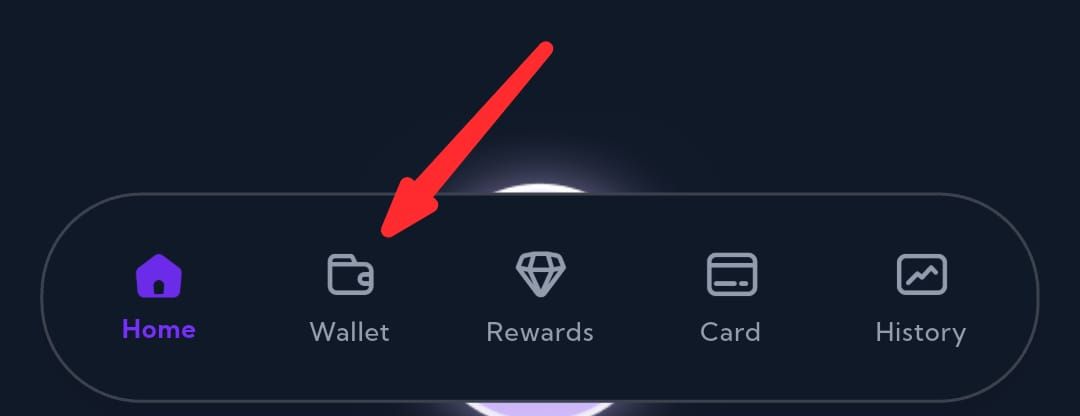
Tap the "Wallet" icon on the bottom navigation bar
Step 2
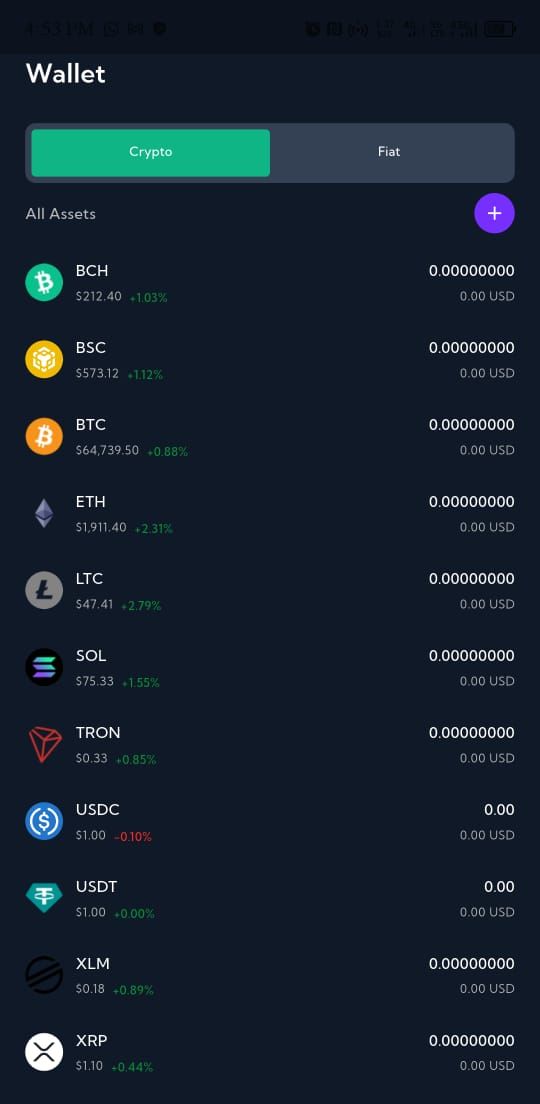
Select the wallet that contains the cryptocurrency you want to swap from.
Step 3
Select the asset and choose a network.
Step 4
On the wallet page, tap "Swap"
Step 5
On the swap screen, select the cryptocurrency you want to swap from.
Step 6
Select the cryptocurrency you want to receive.
Step 7
Add the amount and click on "Confirm Swap"
Step 8
Review the transaction details carefully, and click on "Continue"
Step 9
Enter your 4-digit transaction** PIN** to authorize the swap.
Step 10
Go to your wallet and confirm the swap.
Paragon makes crypto swaps seamless, with competitive rates, and a user-friendly interface.
Cryptocurrencies You Can Swap on Paragon
Paragon supports several popular cryptocurrencies for swapping, allowing users to diversify their portfolios with ease. While available assets may change over time, users can typically exchange major cryptocurrencies such as:
-
Bitcoin (BTC)
-
Ethereum (ETH)
-
USDT
-
USDC
-
Solana (SOL)
-
Litecoin (LTC)
-
Tron (TRX)
-
And others
Always check the app for the latest list of supported cryptocurrencies before initiating a transaction, as new assets may be added regularly.
Common Mistakes to Avoid
Even experienced crypto users can make avoidable errors. One of the most common is selecting the wrong cryptocurrency pair. Always double-check both the asset you're sending and the one you're receiving before confirming the swap.
Another mistake is ignoring network fees. While these fees are usually small, they can affect the final amount you receive, especially on lower-value transactions. Reading the transaction summary carefully ensures there are no surprises.
Finally, never rush through the confirmation screen. Cryptocurrency transactions cannot usually be reversed once processed. Spending an extra moment reviewing the details can save you from costly mistakes.
CONCLUSION
Choosing the right platform can make your crypto experience significantly smoother, and Paragon aims to provide exactly that. It's clean interface removes much of the complexity often associated with cryptocurrency exchanges, making it easy for beginners to navigate while still offering the speed and functionality experienced traders expect.